Tradeforce: A Python-based Trading Framework
Tradeforce is a comprehensive Python-based trading framework designed for high-performance backtesting, hyperparameter optimization, and live trading. By leveraging Just-In-Time (JIT) machine code compilation, Tradeforce is able to run trading simulations on whole markets (100+ assets) covering years of historical data. This benefit of speed allows to find optimal hyperparameters of trading algorithms within large search spaces in a reasonable amount of time. Setups via Docker compose stack offer flexible deployment options and enable scalability to cluster environments.
Architecture
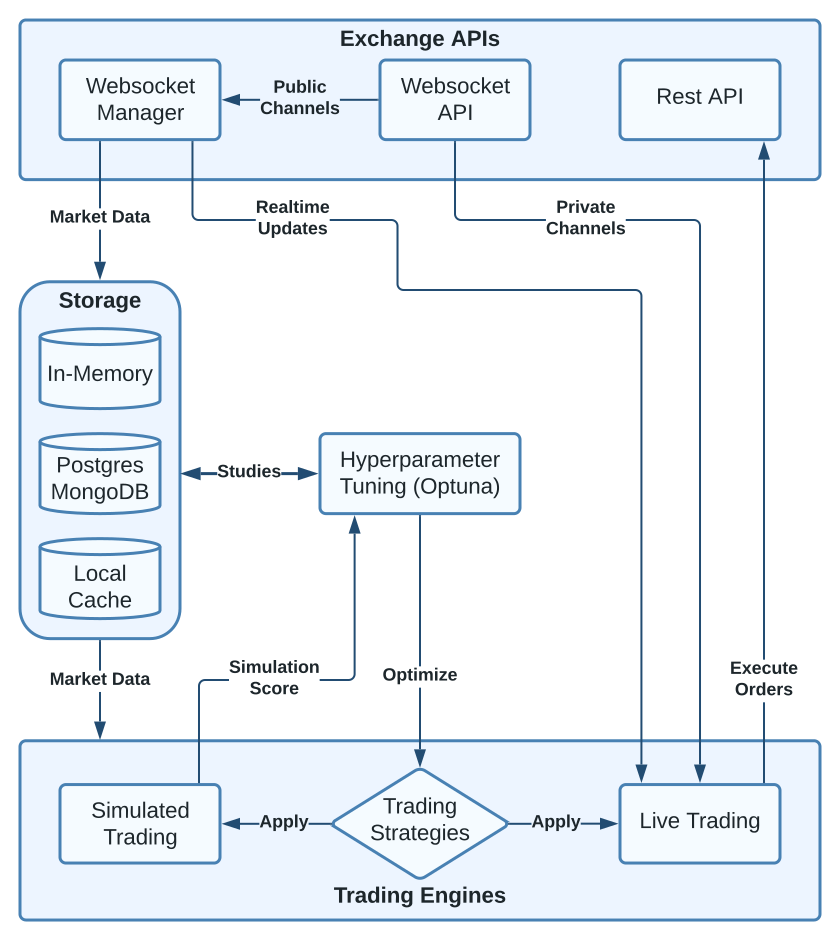
Exchange APIs
Technically, Tradeforce could process any type of time series or financial market datasets like stock markets. However, for the sake of convenience the Bitfinex API is integrated into the framework to provide access to a large amount of historical market data with ease. Users can configure to fetch data for different timeframes (from days to years) and resolutions (1-minute to 1-week candle intervals) for numerous assets. Tradeforce can also maintain real-time market updates via WebSocket connections. For reference, see the config options on market_history and initial_relevant_assets.
Note
Currently only Bitfinex Exchange is supported as Trading API and Data Source. Additional Exchange APIs or Data Sources might be added in the future.
Websocket API: Real-time market updates for all assets on Bitfinex. Public channels provide candle and trade data without authentication, just rate limits apply. Private channels provide user specific order and position updates: Authentication is required. See config options
run_liveandcredentials_pathfor more details.REST API: Provides public endpoints for gathering asset status, metrics and metadata (not shown in diagram). As well as private endpoints (authentication required) to manage orders and wallets.
Websocket Manager: Handles and maintains simultanious connections to the Bitfinex Websocket API, which may include 100+ assets of the market. Also provides methods for subscribing to channels and processing wallet and order updates.
Storage
Market Server |
Simulations |
Live Trading |
Optuna |
|
|---|---|---|---|---|
Postgres |
☑ |
☑ |
☑ |
☑ |
MongoDB |
☑ |
☑ |
☑ |
☐ |
Local Cache |
☑ |
☑ |
☐ |
☐ |
For storing historical trading data, Tradeforce currently supports Postgres and MongoDB as database backends. However, only Postgres supports the full range of features and is therefore the recommended default. MongoDB is supported for historical data storage, live trading and standard simulations. However, hyperparameter optimization is not suppported because Optuna relies on SQL / Postgres.
In-Memory: Once the market history data is initially fetched from remote API or loaded from local cache or database, a mirror of the data is stored in memory for fast access (as Pandas DataFrame). All operations are performed on this in-memory data.
Postgres / MongoDB: All market (candle history) and trading (e.g. buy / sell) data can be stored in a database. For hyperparameter optimization via Optuna, Postgres is required. It stores the optimization history and results (Studies) in Postgres to allow for sharding and and thus parallelization of the optimization process. For reference, see the config options at backend and examples.
Local Cache: If enabled (see
local_cache), the market history data will get dumped into a local cache (as .arrow file) to avoid fetching the same data from the database backend or remote API again. It also significantly speeds up the initial loading of the data into memory. This is essential for hyperparameter optimization via Optuna, because the process requires to load the data many times.
Trading Engines
Tradeforce allows to run trading strategies / algorithms as simulation or in live mode. In simulation mode a performance score is returned. Using the Optuna framework, this score can be optimized by searching for the ideal parameters of the implemented strategy. In Optuna, an optimization process is referred to as a “study.” Tradeforce returns a Study object after a successful optimization run, which can be used for analyzing and visualizing results within a Jupyter Notebook.
Trading Strategies: A trading strategy / algorithm consists of three main functions:
pre_process(),buy_strategy(),sell_strategy(). See Default strategies for implementation details. The strategy functions and its parameters get applied to either the live trader or the simulation engine (see Run Modes).Simulated Trading: The simulation engine allows to run a trading strategy on historical market data. It returns a performance score (e.g. profit corrected for variance) for the given strategy and parameters (See return
scoreofrun_sim()). The simulation engine can be used for hyperparameter optimization via Optuna. See Run Modes :run_sim_optuna()for more details.Live Trading: The live trader allows to run a trading strategy on the Bitfinex Exchange in real-time. It has access to historical market data as well as live updates via Websocket Manager. See Run Modes :
run()for more details.
Hyperparameter Tuning
Tradeforce uses the Optuna framework for hyperparameter optimization. The parameters of a trading
strategy can be optimized by searching for the “ideal” values within a given search space.
Usually some kind of performance score is used as objective for optimization. In the default
implementation this is mean profit of subsets corrected for variance, for details see
run().
For examples of Optuna usage, see hyperparam_search.py and hyperparam_search_multiprocess.py. The results of an optimization run (called Study) are stored in the Postgres database backend and can be analyzed and visualized within a Jupyter Notebook. See hyperparam_search_result_analysis.ipynb.
Also see the Optuna documentation: https://optuna.readthedocs.io/en/stable/